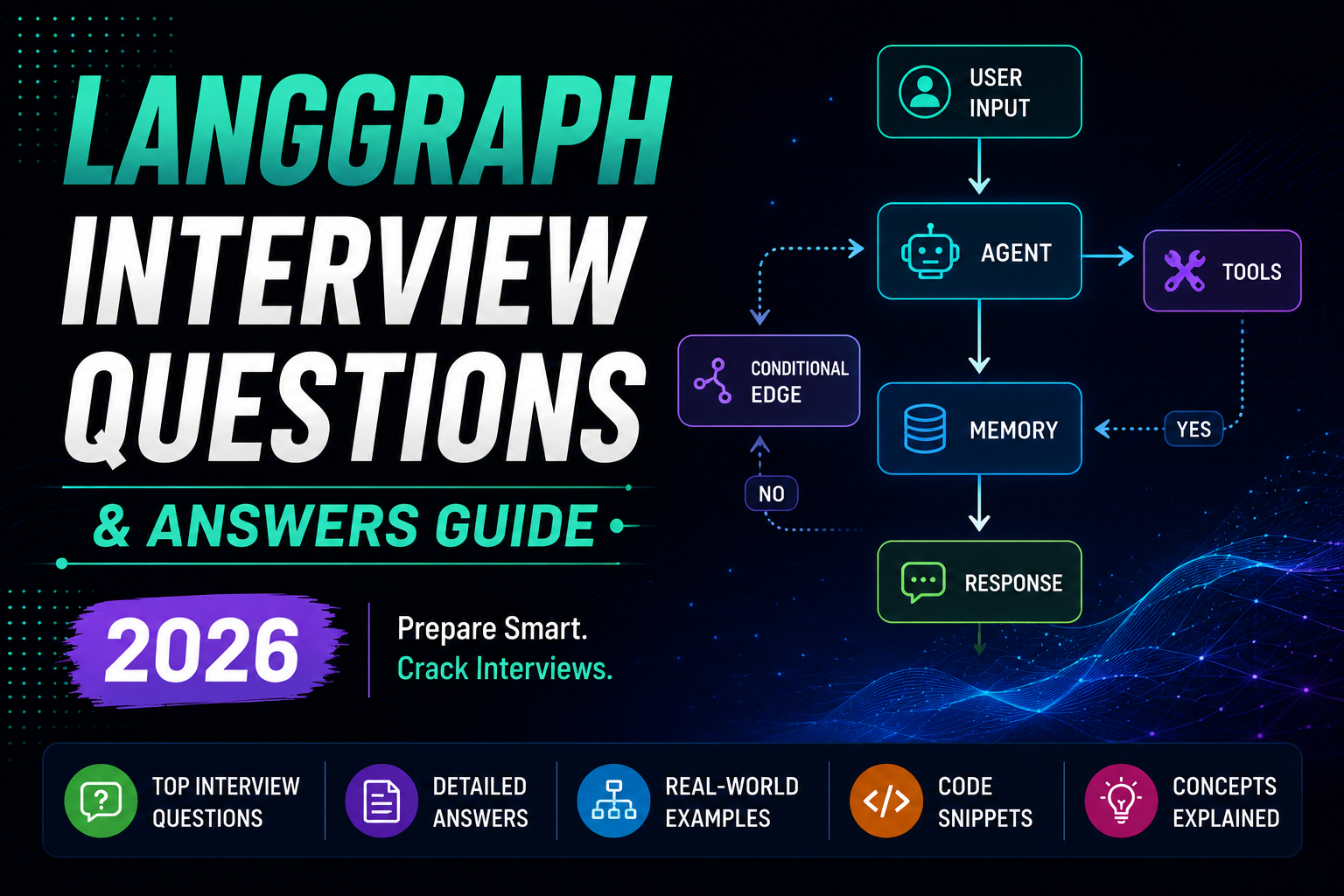
LangGraph has become one of the most sought-after key skills for anyone building ai applications with large language models, ai agents, and retrieval augmented generation workflows. This comprehensive guide covers the most common langgraph interview questions with clear answers and explanations designed so that freshers, junior developers, and machine learning engineers can follow along and prepare confidently.
LangGraph extends the LangChain ecosystem by adding graph-based orchestration, state management, and support for long-running conversational agent workflows in complex AI systems. LangChain is a framework for applications powered by LLMs, and LangChain simplifies integrating large language models into production pipelines. LangGraph sits on top of it, providing the control flow that linear chains cannot.
At Codex Junction, a 360° digital and IT solutions agency, we build production-grade GenAI and RAG solutions for small- to mid-sized business clients. The interview questions and answers below reflect real-world project needs we encounter daily. This article covers basic questions, core components, llm workflow design, rag pipeline integration, debugging, system design, and practical examples that commonly appear in ai interview and coding challenges rounds.
Understanding the LangGraph Interview Landscape
LangGraph questions typically surface as part of broader GenAI, LLM, or langchain application interview rounds for roles like ai engineer, LLM Engineer, and GenAI Developer. Candidates are tested on core graph orchestration concepts in LangGraph, and you should expect practical coding questions focused on building workflows and debugging. Behavioral interview questions often assess adaptability and conflict resolution skills alongside technical depth.
Here are the common rounds where LangGraph shows up in technical interviews:
- System design round: Sketch a workflow graph for a rag application, define state schemas, explain routing logic for customer queries.
- Coding round: Build a simple graph with nodes and edges in Python pseudocode. Expect coding challenges involving retries, conditional branching, and state updates.
- Scenario-based round: Debug a multi-agent flow, optimize token usage, handle follow up questions about trade offs in latency vs. cost.
Recruiters in 2025–2026 expect candidates to know langchain components (models, prompt template, tools, document loaders, retrievers) alongside LangGraph concepts (nodes, edges, typed state, checkpointing, interrupts). Candidates must demonstrate an understanding of AI/ML technologies and their application in agent systems.
Salary context matters for motivation: GenAI Engineer roles in India range from approximately INR 8–30 LPA, while US and Europe mid-level AI engineers command $110k–$200k annually. Interviewers increasingly test ability to design robust rag systems and ai agents that handle long documents, human-in-the-loop review, and multi step reasoning rather than just knowing API surface areas.
Basic LangGraph Interview Questions & Concepts
If you know basic Python and perhaps some LangChain, this section will ground you in the fundamentals. These basic questions appear in nearly every GenAI interview for entry-level roles. Langchain interview questions and LangGraph questions often overlap here.
Q: What is LangGraph, and how does it relate to LangChain? LangGraph is an orchestration runtime that runs llm workflow processes as directed graphs built on top of LangChain or other LLM stacks. While LangChain provides the building blocks (LLMs, prompt templates, tools, retrievers), LangGraph arranges how those pieces execute with explicit branching, loops, and state. Think of LangChain as the toolkit and LangGraph as the workflow engine.
Q: Why do we need LangGraph instead of just chains and agents? Chains follow a fixed sequence of actions and provide predictable execution flows for tasks. Chains are useful for deterministic tasks like summarization. However, agents dynamically decide actions based on user input, and agents can call tools like APIs or databases dynamically. The big difference is that neither chains nor basic agents handle complex loops, retries, or long-running state well. LangGraph allows for complex workflows with state management and agent orchestration that go far beyond linear pipelines.
Q: What is a node in LangGraph? A node is a unit of computation: an LLM call, tool execution, router, or evaluator function. Each node receives the current state, performs work, and returns state updates. Example: a “Retriever” node takes the user query from state, fetches relevant documents from a vector database, and writes them into a retrieved_documents field.
Q: What is an edge in LangGraph? Edges determine which node runs next. They can be unconditional (always go to the next node) or conditional (a function inspects state and picks a branch). Example: after an “Evaluation” node, if quality_score < 0.8, the edge routes to a “Refine Answer” node; otherwise it routes to END.
Q: What is a prompt template? Prompt templates are reusable formats for AI instructions. They allow dynamic values to be inserted into prompts, and a prompt template can include multiple input variables. They help avoid repetitive prompt writing in applications and improve clarity and maintainability of code. You use them inside LangGraph nodes to create prompts consistently.
Q: What is state in LangGraph? State is a structured object (often a Python TypedDict or Pydantic model) that moves through the graph. It holds conversation history, retrieved content, quality scores, retry counts, and user metadata. Every node reads from and writes to this shared state.
Q: What is an LLM workflow in LangGraph terms? A directed graph of nodes connected by edges, starting at an entry point and ending at an END node. State circulates through the graph, getting updated at each step. Example: user input → normalization node → retriever → answer generation → evaluation → END or loop back.
Core Components of LangGraph: Nodes, Edges, and State
Just as langchain interview questions cover prompts and chains, LangGraph interviews drill into core components. Common langchain interview questions include prompts and chains, but LangGraph adds a layer of graph-based orchestration on top.
Node types you should know:
| Node Type | Purpose | Example |
|---|---|---|
| LLM Node | Text generation, summarization | Draft an email response |
| Tool Node | External api requests, database lookups | Query a CRM via REST API |
| Router Node | Classify intent, pick a branch | Route “billing” vs. “technical” queries |
| Evaluator Node | Score output quality | Check if final answer meets threshold |
| Human-Feedback Node | Await human approval | Review before sending sensitive data |
Tools in LangChain enable actions like API calls and database queries, and agents in LangChain dynamically decide actions based on input. Inside LangGraph, these tools become callable within nodes.
Edges include conditional edges that control the flow of execution based on state conditions, default edges for fallback routing, and unconditional edges for fixed transitions. Understanding reducers is essential for state updates in LangGraph-reducers define how multiple node outputs merge into state fields like messages (appended) vs. quality_score (replaced).
A typical interview question: “Walk me through the core components of a LangGraph workflow for a rag application.” Your answer should define the state schema with fields like messages, retrieved_documents, quality_score, and retry_count, then explain nodes for retrieval, generation, and evaluation, then describe conditional edges for retry logic. Understanding these components is essential when explaining how retrieval augmented generation, long documents handling, or multi step reasoning works in interview scenarios.
LangGraph vs LangChain in Interviews: When to Use What
Interviewers frequently ask candidates to compare LangChain and LangGraph to test architectural thinking rather than pure syntax knowledge. This comparison is almost guaranteed in advanced ai interview panels covering langgraph interview questions.
When to use LangChain alone: LangChain is best for linear or slightly branched flows-prompt → model → output parser-and quick prototypes. Chains in LangChain connect multiple steps in a sequence, and memory in LangChain stores conversation history for context. For a simple Q&A bot or a custom chain for summarization, LangChain is enough.
When to use LangGraph: LangGraph is the right choice for complex tasks requiring loops, retries, human review, multi-agent coordination, or durable state. LangChain supports retrieval augmented generation rag for enhanced responses, but LangGraph orchestrates how those RAG steps execute, retry, and branch. Creating a reliable agent requires understanding system design principles and engineering trade offs, and LangGraph makes those trade offs explicit.
The key difference: LangChain chains and langchain agents hide control flow inside model outputs. LangGraph makes control flow explicit via graphs, edges, and declarative routing. LangChain excels at integrating LLMs, prompt templates, tools, document loaders, and vector stores. LangGraph excels at orchestrating these components at scale.
If the interviewer asks: “For a support chatbot with escalation to a human agent, would you use LangChain or LangGraph?” explain that you’d use LangGraph for robust routing, escalation, and state persistence while using LangChain components inside each node.
LangGraph and Retrieval-Augmented Generation (RAG) Workflows
Retrieval augmented generation is central to GenAI system design and many interview questions in 2025–2026. RAG combines information retrieval with large language models. RAG retrieves relevant information from external data sources and enhances LLMs by providing context for generation. RAG helps generate accurate and context aware responses by grounding llm responses in real data. RAG uses embeddings and vector databases for retrieval, turning text into numerical representations (vector representations) stored in vector stores.
A canonical rag application graph in LangGraph:
- Node 1 – Question Normalization: Clean up user input, rephrase for clarity.
- Node 2 – Retriever: Call a vector database (Chroma, FAISS, Pinecone) built from long documents via LangChain document loaders and an embedding model. LangChain integrates with vector databases for enhanced retrieval. LangChain supports RAG by retrieving documents from external sources.
- Node 3 – Answer Generation: LLM node that uses retrieved documents as relevant context to enhance llm responses and produce a final answer.
- Node 4 – Answer Evaluation: Scores relevance and model response quality. If the score is low, a conditional edge loops back to retrieval with a refined query.
Common interview questions here:
“How would you implement a rag application using LangGraph and LangChain together?” Use LangChain for document loaders, embeddings, vector db, and prompt engineering. Use LangGraph to orchestrate the retrieval systems, answer generation, evaluation, and retry logic as a stateful graph.
“How does LangGraph help reduce hallucinations in rag pipeline workflows?” LangGraph enables conditional retries when the retriever returns low-quality context. Explicit loops like “re-retrieve with a refined query until quality > threshold” ensure the LLM receives relevant documents before generating. Human-in-the-loop validation nodes add another safety layer for domains like finance or healthcare.
State holds retrieved chunks, their scores, and metadata (section, page). Semantic chunking with overlapping windows ensures retrieved data captures relevant context across chunk boundaries. This lets you handle even 200-page documents without losing relevant information.
State Management & Checkpointing in LangGraph
State management is critical in LangGraph applications for managing execution flow and data persistence. These advanced concepts appear frequently in mid-level and senior langgraph interview questions because they directly affect reliability and cost in production.
Checkpointing is a mechanism in LangGraph to enable persistence and debugging. It means saving workflow state at certain nodes so that long-running ai agents can resume after failures, restarts, or timeouts without losing context.
Typical interview question: “Explain how LangGraph’s state and checkpointing help build long-running AI agents for support automation.”
Key talking points for your answer:
- Persist state whenever you reach a stable milestone (after retrieval, after human review, after answer generation).
- Resume execution from the last checkpoint if an API rate limit or transient error occurs-avoid duplicating side effects like resending emails.
- Keep token usage in check by summarizing old state fields when they grow too large.
LangChain provides several memory types that integrate well here. Memory in LangChain stores conversation history for context. ConversationBufferMemory stores entire conversations for short chats, while ConversationSummaryMemory summarizes conversations to prevent token overflow. ConversationBufferWindowMemory keeps only the last N messages, and VectorStoreRetrieverMemory uses embeddings to retrieve relevant past context from earlier exchanges.
Real-world examples:
- A daily report generation bot: state tracks completed sections; checkpoint after each section; if failure in section 4, restart from checkpoint 3.
- A multi-step onboarding wizard: state tracks steps completed; human feedback step in between; if user reconnects, checkpoint allows resuming.
At Codex Junction, production GenAI automations for SMBs (like lead qualification bots) rely heavily on durable state to handle thousands of daily conversations without losing conversation history or business rules.
Designing LangGraph for AI Agents and Multi-Agent Systems
Many ai interview panels ask candidates to design multi-agent systems and expect LangGraph as the orchestrator. Multi-agent coordination is a key feature of LangGraph, surpassing basic agent capabilities found in standard langchain agents.
An agent can be modeled as a node that:
- Receives the current state (user query, external knowledge gathered so far, previous decisions).
- Chooses tools (web search, CRM API, vector db lookup) through LangChain or custom tools. Agents in LangChain can dynamically choose tools for tasks, and tool calling in LangGraph enables agents to utilize external resources and handle errors.
- Emits an updated state with actions taken and intermediate results.
LangChain uses RequestsWrapper to call external APIs, making it easy for tool nodes to reach external data and private data sources. Human-in-the-loop workflows enhance the interactivity of agent systems in LangGraph applications, letting reviewers approve or redirect agent outputs.
Example use case Codex Junction might build: A marketing campaign generator with agents for audience research, keyword research (SEO), content drafting, and performance prediction-all orchestrated as a graph. Each agent is a node; edges define hand-offs; state carries audience profiles, keywords, drafts, and evaluation scores.
Interview questions to practice:
“How would you design a multi-agent LangGraph workflow for automating content ideation?” Define agent nodes for research, writing prompts generation, and brief creation. State holds topic, audience data, draft outputs. Conditional edges route back to research if the evaluator node scores the brief below threshold.
“How does LangGraph coordinate multiple AI agents while keeping a single consistent state object?” All agents read from and write to the same typed state. Reducers determine how concurrent updates merge. Edges enforce ordering so that dependent agents wait for upstream outputs.
Handling Long Documents and Complex Data Flows with LangGraph
Many real-world GenAI systems for enterprises involve long documents-contracts, policies, medical records-that require careful orchestration. Scalability is a significant challenge when designing LangGraph systems for large datasets, making this a common topic in interview scenarios.
LangGraph works with LangChain document loaders, text splitters, embeddings, and vector stores to handle these flows:
- Load: PDFs, DOCX, HTML via document loaders.
- Chunk: Split long documents into semantically coherent pieces using semantic chunking or RecursiveCharacterTextSplitter with overlapping windows.
- Index: Store embeddings in a vector database with metadata (section, page, document type) to enable fast query time lookups via hybrid search.
Common interview question: “How would you handle a 200-page policy document in a Q&A system using LangGraph?”
Answer structure:
- Use LangChain loaders + text splitters for chunking into manageable pieces.
- Index embeddings in a vector db with metadata for filtering.
- Use LangGraph to manage flows: question understanding → context retrieval → answer drafting → quality checking → summarization if needed.
- State tracks which document segments have been processed or summarized, avoiding redundant LLM calls and reducing cost.
Edge cases to mention: cross-document retrieval (multiple files) where edges branch based on document type (e.g., HR policy vs. legal contract), and handling retrieved content from large scale systems where multiple retrieval rounds may be needed.
Typical Coding & System Design LangGraph Interview Questions
Beyond theory, interviewers often ask candidates to sketch or code simple LangGraph workflows in Python, especially for ai engineer and backend roles. These practice problems test whether you can translate architectural thinking into working logic.
Q: Write pseudocode to create a LangGraph workflow with three nodes: classify intent, retrieve documents, answer question.
state = {"query": str, "intent": str, "docs": list, "answer": str}

def classify_intent(state): → updates state["intent"]
def retrieve_docs(state): → updates state["docs"]
def answer_question(state): → updates state["answer"]

graph.add_node("classify", classify_intent)
graph.add_node("retrieve", retrieve_docs)
graph.add_node("answer", answer_question)
graph.add_edge("classify", "retrieve")
graph.add_edge("retrieve", "answer")
graph.set_entry("classify")
graph.set_finish("answer")
Q: Design a graph that retries LLM calls up to 3 times when responses do not meet a quality threshold. State includes retry_count and quality_score. After the evaluator node, a conditional edge checks: if quality_score < 0.8 and retry_count < 3, loop back to the generation node (incrementing retry_count). Otherwise, proceed to END or a fallback node. Debugging infinite loops requires specific strategies when implementing agent workflows-always include a max-retry guard.
Q: How would you add a human approval step before sending emails drafted by an AI agent? Insert a “Human Approval” node between the writer node and the send node. Define a checkpoint before this node. If the reviewer approves, the edge routes to “Send Email.” If rejected, the edge routes back to “Edit Draft.” State tracks approved_by_human as a boolean.
Q: Show how you would integrate a LangChain retriever node into LangGraph for a rag pipeline. Wrap the LangChain retriever inside a node function that reads state[“query”], calls the retriever, and writes results into state[“retrieved_documents”]. Connect it via edges to downstream generation and evaluation nodes.
These coding challenges are best practiced with hands on practice in a local Python environment using real data from your own projects.
Advanced LangGraph Topics: Human-in-the-Loop, Evaluation, and Safety
In senior or lead-level interviews, langgraph interview questions go beyond basic nodes into governance, safety, and human oversight. Production engineering involves debugging, observability, and performance metrics for LangGraph applications.
Human-in-the-loop (HITL): LangGraph can include human review nodes that pause execution until a reviewer approves or edits an LLM draft. The node checkpoints state before entering the HITL step so recovery is possible if the process restarts. State fields like approved_by_human and reviewer_notes track decisions.
Evaluation nodes: Implement evaluation nodes that score llm responses on criteria like accuracy, tone, and policy compliance. If confidence is low, route to fallback nodes-send the user to a human agent or display an “I’m not sure” message.
Safety patterns:
- Automatic post-generation checks for PII leakage in sensitive data fields.
- Separate evaluator models or rule-based filters for content safety.
- Logging all state transitions for auditability.
Example interview question: “How would you implement a human-in-the-loop review step for financial advice responses in LangGraph?” Define a review node with checkpoint. State includes draft_response, approved_by_human, rejection_reason. If rejected, edge routes to a revision node. If approved, continue to delivery. Log every approval action for compliance.
“How can LangGraph help enforce content safety policies in a production chatbot?” Add evaluator nodes after generation that check for policy violations, sensitive data exposure, and bias. Conditional edges route flagged responses to human review or safe fallback messages.
Debugging, Monitoring, and Observability: LangGraph with LangSmith
This section is critical for production readiness and frequently appears in advanced ai interview and system design rounds. Performance evaluation in LangGraph includes latency and cost tracking for agent actions.
LangSmith is a debugging tool for LangChain applications. LangSmith traces every LLM call and monitors performance across your entire graph. For quick local debugging, set_debug(True) logs detailed information about LangChain execution, showing prompt inputs, model outputs, and tool results at every step. Logging tools help debug and benchmark LangChain applications at scale.
Sample interview question: “You’ve deployed a LangGraph-powered rag application, and users are getting irrelevant answers. How would you debug this?”
Step-by-step answer:
- Use LangSmith traces to see which nodes executed and in what order.
- Check retriever results in the state-are the retrieved documents actually relevant? Look at similarity scores.
- Inspect prompts and outputs at the answer generation node-is the prompt template pulling in relevant context correctly?
- Examine conditional edges-is the evaluation node routing correctly based on quality scores?
- Adjust retrieval settings (chunk size, overlap, embedding model), prompt design, or fine tuning parameters, then re-run evaluation.
Callbacks or logging hooks at node boundaries capture node-level metrics: latency per node, error rates, token usage per call. This data shapes optimization and fine tuning decisions, helping you identify bottlenecks before they affect users.
Optimizing Costs, Latency, and LLM Responses in LangGraph Workflows
Production constraints around API costs and response times drive common interview questions on optimization in LangGraph-based retrieval systems. Keeping cloud bills predictable matters, especially for SMBs.
Key optimization strategies:
- Caching: Use caching nodes so repeated customer queries do not always hit the LLM. Store recent query-response pairs keyed by semantic similarity.
- Summarization nodes: Compress conversation history or retrieved documents to save tokens. This is essential when conversation history grows across many exchanges.
- Parallelization: Run independent nodes simultaneously (e.g., fetch from two different vector stores at once) to reduce latency.
- Model routing: Route simple queries to cheaper models; send only complex tasks to expensive models like GPT-4 or Claude. This can make a big difference in monthly costs.
- Early exit: Short-circuit when a simple rule-based answer is enough, skipping expensive LLM nodes entirely.
Interview questions to prepare:
“How would you reduce token usage in a LangGraph-based customer support bot?” Implement ConversationSummaryMemory to compress old messages, prune irrelevant retrieved content, filter low-score chunks before passing to the LLM, and use smaller models for non-critical steps like intent classification.
“Explain an optimization you’d make if a particular node is causing high latency.” Profile the node using LangSmith traces. If it’s the retriever, consider a faster vector db or pre-filtered hybrid search. If it’s the LLM, reduce input tokens via summarization, switch to a faster model, or batch api requests.
Codex Junction regularly applies these patterns in client solutions-lead-qualification chatbots and knowledge-base assistants-to keep cloud bills predictable for SMEs while maintaining model response quality.
Preparing for LangGraph Interviews: Roadmap for Freshers and AI Engineers
Here’s a practical study roadmap for freshers, junior data scientists, and ai engineers targeting GenAI roles. Building applications with LangGraph requires layered preparation, not just memorizing answers.
Step 1: Strengthen Python fundamentals. Functions, dictionaries, dataclasses, TypedDict, async behavior, and type annotations. Most LangGraph code is pure Python. A solid computer science foundation in data structures helps too.
Step 2: Learn LangChain basics. Master prompt template usage, chains, tools, document loaders, embeddings, and vector stores. Understand how to create prompts with dynamic variables. Build a simple langchain application that answers questions from external data.
Step 3: Build a simple RAG application using LangChain only. Question → retrieve → answer. Add memory. Test with real data from a PDF or website. Experiment with different embedding model options.
Step 4: Rebuild the same RAG app using LangGraph. Define state schema, nodes for retrieval, answer generation, evaluation. Implement retries, a human-review node, and logging. This hands on practice is what transforms theoretical knowledge into interview-ready confidence. Check out our Top 20 AI ML Interview Questions for Freshers for complementary preparation.
Step 5: Practice answering 20–30 curated langgraph interview questions. Cover basics, core components, multi-agent design, debugging, and prompt engineering. Work through practice problems and interview scenarios systematically.
Quick practice prompts to try:
- “Explain your last GenAI side project and how you’d redesign it using LangGraph.”
- “Draw a simple graph diagram for a customer support agent workflow.”
- “How would you handle a conversational agent that needs to maintain up to date context across 50+ messages?”
Build small portfolio projects-a documentation Q&A bot, a resume analyzer, or a lead qualification bot-that match job descriptions for GenAI roles and give you real talking points.

How Codex Junction Uses LangGraph in Real Client Projects
Here’s how a 360° digital and IT agency actually uses LangGraph across web/app development, automation, and marketing workflows. These are the kinds of architectures interviewers test with advanced langgraph interview questions.
Project 1: B2B SaaS Client Support Assistant A support assistant integrating a client’s knowledge base and CRM. Graph nodes handle routing between self-service FAQ lookup (via retriever and vector database), AI-generated answers, and human escalation. State holds conversation history, user metadata (account type, subscription tier), and fallback steps. LangChain components used: document loaders for knowledge base ingestion, retrievers for context-aware search. LangGraph patterns: stateful workflows with conditional edges, checkpointing for session durability. Non-functional requirements: latency under 2 seconds, escalation only when confidence is low, compliance filtering for sensitive data.
Project 2: Marketing Content Automation Pipeline A multi-agent graph generating SEO blog briefs and social media calendars from client inputs. Agent nodes for audience research, keyword research, content drafting, and performance prediction. Human approval at the content brief stage. An evaluator node checks brand voice compliance. LangGraph orchestrates the entire building ai applications pipeline end-to-end, ensuring each agent contributes to a single consistent state.
Project 3: Policy Document Q&A Bot A business automation bot reading long FAQ and policy documents. Loads PDFs and HTML, splits via semantic chunking, indexes in a vector database with metadata. LangGraph manages flows for question understanding, context retrieval from external knowledge sources, answer drafting, quality evaluation, and human review for domain-sensitive responses. Edges branch based on document type-HR policy vs. legal contract-ensuring the right retrieval systems and prompt engineering approaches are applied.
Each project demonstrates the kind of up to date, production-grade thinking that separates strong candidates from average ones in technical interviews.
Conclusion: Mastering LangGraph for Next-Gen AI Interviews
LangGraph has become a central skill for designing reliable, stateful GenAI systems. When combined with langchain components and retrieval augmented generation techniques, it enables workflows that handle everything from simple FAQ bots to large scale systems with multiple ai agents, human oversight, and durable state.
Mastering the interview questions in this guide-from basic questions about nodes and edges to advanced concepts like checkpointing, multi-agent coordination, and debugging with LangSmith-prepares you for 2025–2026 ai engineer and LLM roles. Interviewers want to see that you understand not just the APIs, but the architectural reasoning behind choosing LangGraph for complex tasks.
Build at least one end-to-end LangGraph project-a documentation Q&A bot, a resume analyzer, or a conversational agent-so you can speak confidently about real-world design decisions. Use real data, implement retries, add evaluation nodes, and practice explaining your graph structure as if you were in a system design round.
Codex Junction helps businesses turn these architectures into production-ready solutions. Whether you’re preparing for your next interview or building applications for clients, practicing with real use cases is the single best way to internalize these concepts and stand out.