
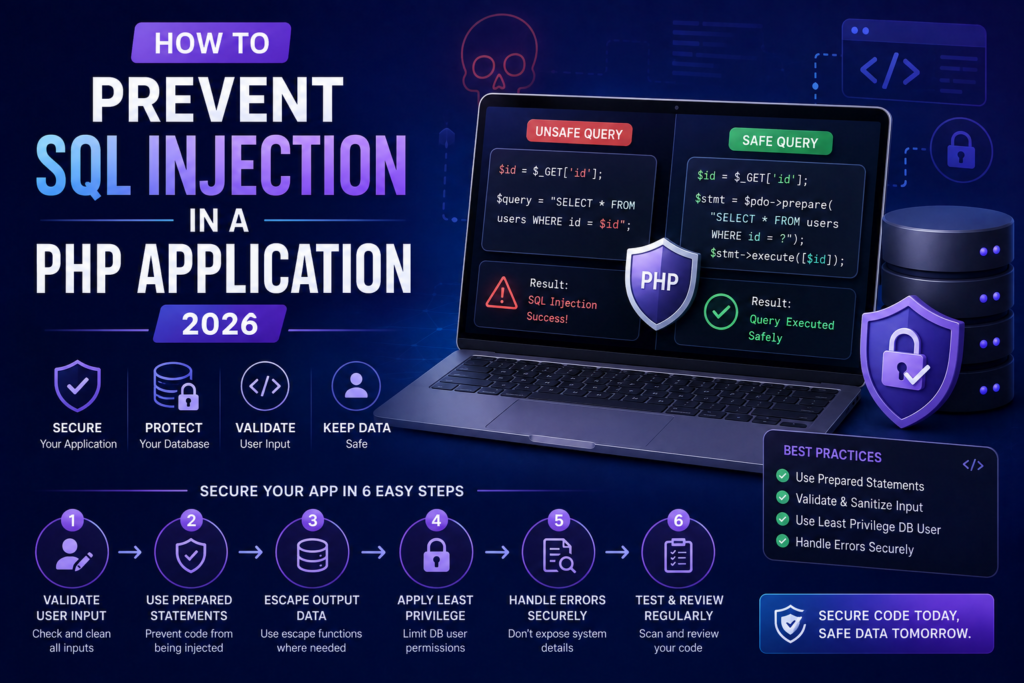
How to Prevent SQL Injection in a PHP Application is an important security topic for every PHP developer, especially beginners who are learning how to build database-driven websites and web applications.
PHP is widely used for creating websites, login systems, e-commerce applications, dashboards, APIs, content management systems, and other web applications. Most of these applications communicate with a database such as MySQL. Whenever an application accepts information from users and uses that information in a database query, security becomes extremely important.
If user input is directly inserted into an SQL query, an attacker may manipulate the query and access information they should not be able to access. This type of attack is known as SQL injection.
Learning How to Prevent SQL Injection in a PHP Application means learning how to safely handle user input, use prepared statements, validate data, restrict database permissions, and avoid unsafe SQL query construction.
The good news is that preventing SQL injection in PHP does not require complicated programming. By following a few important security practices, beginners can significantly improve the security of their PHP applications.
In this tutorial, we will explain How to Prevent SQL Injection in a PHP Application step by step using simple PHP examples.
What Is SQL Injection?
SQL injection is a security vulnerability that happens when an application allows untrusted user input to become part of an SQL query.
For example, a beginner might write:
$username = $_POST['username'];

$sql = "SELECT * FROM users WHERE username = '$username'";

$result = mysqli_query($connection, $sql);
The problem is that $username comes directly from the user.
The application combines SQL commands and user-controlled data into the same string. An attacker may then attempt to provide specially crafted input that changes the behavior of the SQL query.
This is why understanding How to Prevent SQL Injection in a PHP Application is essential before building applications that work with databases.
A safer approach is to separate the SQL statement from the user-provided value by using a prepared statement.
Why Is SQL Injection Dangerous?
Understanding How to Prevent SQL Injection in a PHP Application is important because SQL injection can have serious consequences.
Depending on the application’s database permissions and the vulnerable query, an attacker may potentially:
- Read confidential database records
- Access information belonging to other users
- Modify database records
- Delete database records
- Bypass certain application logic
- Access sensitive application information
- Manipulate search or filtering functionality
- Cause database errors or application failures
For example, if a vulnerable application stores customer information, an SQL injection vulnerability could potentially expose names, email addresses, account information, or other database records.
The exact impact depends on the application’s design, database configuration, permissions, and other security controls.
Therefore, How to Prevent SQL Injection in a PHP Application should be considered a fundamental part of secure PHP development.
How to Prevent SQL Injection in a PHP Application
The best way to understand How to Prevent SQL Injection in a PHP Application is to learn the security practices that should be used whenever PHP communicates with a database.
The most important practices include:
- Use prepared statements.
- Use parameterized queries.
- Validate user input.
- Avoid SQL string concatenation.
- Use allowlists for dynamic SQL identifiers.
- Apply least-privilege database permissions.
- Handle database errors securely.
- Review existing SQL queries.
- Test application inputs.
- Keep PHP and database software updated.
Let’s look at these practices in detail.
1. Use Prepared Statements
The most important technique for How to Prevent SQL Injection in a PHP Application is using prepared statements.
A prepared statement separates SQL instructions from the values supplied by the user.
Instead of creating one large SQL string containing user input, the application creates the SQL structure first and then sends the user input separately.
For example, using PDO:
$email = $_POST['email'];

$stmt = $pdo->prepare(
    "SELECT * FROM users WHERE email = :email"
);

$stmt->execute([
    'email' => $email
]);
Here, :email is a parameter placeholder.
The user’s email is not directly inserted into the SQL statement. Instead, it is passed separately to the database.
This is one of the most important principles when learning How to Prevent SQL Injection in a PHP Application.
2. Use PDO Prepared Statements
PDO is a popular PHP database interface that supports prepared statements.
A basic PDO connection can look like this:
$pdo = new PDO(
    "mysql:host=localhost;dbname=myapp;charset=utf8mb4",
    "db_user",
    "db_password"
);

$pdo->setAttribute(
    PDO::ATTR_ERRMODE,
    PDO::ERRMODE_EXCEPTION
);
You can then use a prepared statement:
$email = $_POST['email'];

$stmt = $pdo->prepare(
    "SELECT id, name, email
     FROM users
     WHERE email = :email"
);

$stmt->execute([
    'email' => $email
]);

$user = $stmt->fetch(PDO::FETCH_ASSOC);
This is significantly safer than creating a query through string concatenation.
When learning How to Prevent SQL Injection in a PHP Application, beginners should become comfortable with PDO’s prepare() and execute() methods.
PDO supports named parameters such as:
:email
:user_id
:name
It also supports positional placeholders.
3. Use MySQLi Prepared Statements
MySQLi is another option for PHP applications that use MySQL.
For example:
$email = $_POST['email'];

$stmt = $mysqli->prepare(
    "SELECT id, name, email
     FROM users
     WHERE email = ?"
);

$stmt->bind_param("s", $email);
$stmt->execute();

$result = $stmt->get_result();

$user = $result->fetch_assoc();
The ? represents a parameter placeholder.
The value of $email is bound separately using bind_param().
Both PDO and MySQLi can be used to implement How to Prevent SQL Injection in a PHP Application correctly.
The important point is not simply which database extension you choose. The important point is that you use prepared statements and parameterized queries consistently.
4. Never Concatenate User Input Into SQL
One of the biggest mistakes beginners make when learning How to Prevent SQL Injection in a PHP Application is concatenating user input into SQL.
Avoid this:
$username = $_POST['username'];

$sql = "SELECT * FROM users WHERE username = '" . $username . "'";
Also avoid:
$id = $_GET['id'];

$sql = "DELETE FROM users WHERE id = " . $id;
These examples directly combine application input with SQL syntax.
Instead, use:
$id = $_GET['id'];

$stmt = $pdo->prepare(
    "DELETE FROM users WHERE id = :id"
);

$stmt->execute([
    'id' => $id
]);
This separation between SQL and data is a core principle of How to Prevent SQL Injection in a PHP Application.
5. Validate User Input
Prepared statements are the primary defense, but input validation is also useful.
Suppose your application expects a numeric user ID.
You can validate it using PHP’s filtering functions:
$id = filter_input(
    INPUT_GET,
    'id',
    FILTER_VALIDATE_INT
);

if ($id === false || $id === null) {
    exit("Invalid ID.");
}
For an email address:
$email = filter_input(
    INPUT_POST,
    'email',
    FILTER_VALIDATE_EMAIL
);

if ($email === false) {
    exit("Invalid email address.");
}
Input validation ensures that the application receives data in the expected format.
However, validation should not replace prepared statements.
For example, developers should not assume that checking whether a value looks like an email address is enough to protect a SQL query.
When implementing How to Prevent SQL Injection in a PHP Application, use validation as an additional security layer.
6. Use Allowlists for Dynamic SQL
Prepared statements are excellent for values, but there is an important limitation.
Parameter placeholders are generally designed for data values, not SQL identifiers such as table names or column names.
For example, do not assume this will work:
$table = $_GET['table'];

$stmt = $pdo->prepare(
    "SELECT * FROM :table"
);
Instead, if your application requires a dynamic column for sorting, use an allowlist.
$allowedColumns = [
    'name',
    'email',
    'created_at'
];

$sort = $_GET['sort'] ?? 'created_at';

if (!in_array($sort, $allowedColumns, true)) {
    $sort = 'created_at';
}

$sql = "SELECT id, name, email
        FROM users
        ORDER BY $sort";
Only values that have been explicitly approved by the application are accepted.
This technique is an important part of How to Prevent SQL Injection in a PHP Application when working with dynamic SQL.
7. Use Least-Privilege Database Accounts
Another important part of How to Prevent SQL Injection in a PHP Application is restricting database permissions.
Your PHP application should not normally connect to MySQL using a database administrator account.
Instead, create a dedicated database account for the application.
The account should receive only the permissions required for normal application operations.
For example, an application that only needs to read and update certain tables should not automatically have unrestricted administrative access to every database.
This is called the principle of least privilege.
If an attacker manages to exploit another vulnerability, restricted database permissions can reduce the potential damage.
8. Handle Database Errors Securely
Database errors can reveal sensitive technical information.
During development, detailed errors can help programmers identify problems. However, production websites should avoid displaying raw database errors to visitors.
For example:
try {

    $stmt->execute();

} catch (PDOException $e) {

    error_log($e->getMessage());

    echo "Something went wrong. Please try again later.";
}
The detailed error is recorded in the server logs, while the visitor receives a generic message.
This approach is another useful practice when implementing How to Prevent SQL Injection in a PHP Application.
Avoid displaying information such as:
- Database names
- Table names
- SQL statements
- Server paths
- Database usernames
- Internal error details
9. Secure INSERT Queries
SQL injection protection is not limited to SELECT statements.
You should also use prepared statements when inserting data.
For example:
$name = $_POST['name'];
$email = $_POST['email'];

$stmt = $pdo->prepare(
    "INSERT INTO users (name, email)
     VALUES (:name, :email)"
);

$stmt->execute([
    'name' => $name,
    'email' => $email
]);
The user-provided values are passed through parameters.
This is a secure pattern for handling database inserts.
Therefore, How to Prevent SQL Injection in a PHP Application applies to INSERT, SELECT, UPDATE, and DELETE queries.
10. Secure UPDATE Queries
An update query should also use parameters.
$id = $_POST['id'];
$name = $_POST['name'];

$stmt = $pdo->prepare(
    "UPDATE users
     SET name = :name
     WHERE id = :id"
);

$stmt->execute([
    'name' => $name,
    'id' => $id
]);
Do not write:
$sql = "UPDATE users SET name = '$name' WHERE id = $id";
The parameterized version is safer and easier to maintain.
Understanding this pattern makes How to Prevent SQL Injection in a PHP Application much easier for beginners.
11. Secure DELETE Queries
Delete operations should also use prepared statements.
Unsafe:
$id = $_GET['id'];

$sql = "DELETE FROM users WHERE id = $id";
Safer:
$id = $_GET['id'];

$stmt = $pdo->prepare(
    "DELETE FROM users WHERE id = :id"
);

$stmt->execute([
    'id' => $id
]);
However, SQL injection protection is not the only security requirement for delete operations.
You should also verify that the logged-in user has permission to delete the requested record.
Prepared Statements vs SQL Escaping
A common beginner question about How to Prevent SQL Injection in a PHP Application is whether functions such as mysqli_real_escape_string() are enough.
Escaping can be useful in certain situations, but it should not be considered your primary SQL injection defense when prepared statements are available.
Prepared statements provide a clearer separation between SQL instructions and data.
For modern PHP development, prefer parameterized queries whenever possible.
This makes the code easier to understand and reduces the chance of accidentally creating an unsafe query.
Common SQL Injection Mistakes in PHP
When learning How to Prevent SQL Injection in a PHP Application, beginners should watch for several common mistakes.
Mistake 1: Using Prepared Statements for Only Some Queries
An application may have 20 database queries, but if one of them directly concatenates user input, that query may still be vulnerable.
Review all database queries.
Mistake 2: Trusting Hidden Form Fields
A hidden HTML field is still controlled by the client.
For example:
<input type="hidden" name="user_id" value="10">
A user can modify client-side values.
Always validate and authorize important values on the server.
Mistake 3: Trusting Numeric Values
Developers sometimes assume that IDs are automatically safe because they should contain numbers.
Always validate server-side input and use parameterized queries.
Mistake 4: Using a Database Administrator Account
A PHP application should generally use a dedicated database account with limited permissions.
Mistake 5: Showing Database Errors
Raw database errors can reveal information about the application’s internal structure.
Log detailed errors privately instead.
How to Prevent SQL Injection in a PHP Application Using PDO
Here is a complete beginner-friendly example:
<?php

$pdo = new PDO(
    "mysql:host=localhost;dbname=myapp;charset=utf8mb4",
    "app_user",
    "secure_password"
);

$pdo->setAttribute(
    PDO::ATTR_ERRMODE,
    PDO::ERRMODE_EXCEPTION
);

$email = filter_input(
    INPUT_POST,
    'email',
    FILTER_VALIDATE_EMAIL
);

if ($email === false || $email === null) {
    exit("Invalid email address.");
}

try {

    $stmt = $pdo->prepare(
        "SELECT id, name, email
         FROM users
         WHERE email = :email"
    );

    $stmt->execute([
        'email' => $email
    ]);

    $user = $stmt->fetch(PDO::FETCH_ASSOC);

    if ($user) {
        echo "User found.";
    } else {
        echo "User not found.";
    }

} catch (PDOException $e) {

    error_log($e->getMessage());

    echo "An unexpected error occurred.";
}
This example demonstrates several principles of How to Prevent SQL Injection in a PHP Application:
- User input is validated.
- A prepared statement is used.
- The email is passed as a parameter.
- SQL and user input remain separate.
- Database errors are logged.
- Sensitive database information is not displayed.
- The application can use a restricted database account.
How to Test Your PHP Application for SQL Injection
After learning How to Prevent SQL Injection in a PHP Application, developers should review their own code for vulnerable queries.
Look for user input coming from:
$_GET$_POST$_COOKIE- Request headers
- JSON request bodies
- API parameters
- Search forms
- Login forms
- Registration forms
- Product filters
- Sorting parameters
Search your PHP project for patterns such as:
"SELECT ... " . $variable
or:
"WHERE id = $id"
These patterns should be reviewed carefully.
You can also perform authorized security testing against your own development or staging application.
Do not test applications or systems that you do not own or do not have permission to test.
SQL Injection Prevention Checklist
Use this checklist when implementing How to Prevent SQL Injection in a PHP Application:
- Use PDO or MySQLi prepared statements.
- Use parameterized queries.
- Never concatenate untrusted input into SQL.
- Validate user input on the server.
- Use allowlists for dynamic SQL identifiers.
- Avoid unnecessary dynamic SQL.
- Use least-privilege database accounts.
- Do not use a database administrator account for normal application queries.
- Do not expose raw database errors.
- Log detailed database errors securely.
- Review old PHP queries.
- Test application forms and APIs.
- Keep PHP updated.
- Keep your database software updated.
- Follow established security guidance.
Frequently Asked Questions
What is the best way to prevent SQL injection in PHP?
The best primary defense is to use prepared statements and parameterized queries. PDO and MySQLi both support prepared statements.
Can prepared statements prevent SQL injection?
Prepared statements are a primary and highly effective defense when user-controlled values are correctly passed as parameters. Applications should also use input validation, authorization, least-privilege database accounts, and secure coding practices.
Is input validation enough to prevent SQL injection?
No. Input validation is an additional security layer. It should not replace prepared statements.
Should I use PDO or MySQLi?
Both PDO and MySQLi can be used securely with prepared statements. PDO is particularly useful when you want a consistent database interface, while MySQLi is designed specifically for MySQL and MariaDB-compatible environments.
Can prepared statements be used for table names?
Generally, parameter placeholders are designed for data values rather than SQL identifiers such as table and column names. If your application needs dynamic identifiers, use a strict allowlist.
Is mysqli_real_escape_string enough?
It should not be your preferred primary defense when prepared statements are available. Parameterized queries provide a stronger and clearer approach.
Does SQL injection affect only login forms?
No. SQL injection can occur anywhere untrusted input is incorporated into SQL queries, including search forms, product filters, APIs, URL parameters, registration forms, and administrative functionality.
How can beginners learn SQL injection prevention?
Start by learning SQL fundamentals, PHP database programming, PDO or MySQLi prepared statements, server-side validation, and basic web application security concepts. OWASP and the official PHP documentation are excellent resources.
External Resources
For additional information about How to Prevent SQL Injection in a PHP Application, use authoritative resources such as:
- OWASP SQL Injection Prevention Cheat Sheet
- PHP PDO Prepared Statements Documentation
- PHP PDO
prepare()Documentation - PHP MySQLi Prepared Statements Documentation
These resources provide detailed technical guidance about SQL injection prevention, parameterized queries, and PHP database programming.
Conclusion
How to Prevent SQL Injection in a PHP Application is a fundamental security skill for PHP developers.
The most important rule is simple: never directly insert untrusted user input into an SQL query.
Instead, use prepared statements and parameterized queries with PDO or MySQLi. Validate input on the server, use allowlists for dynamic SQL identifiers, restrict database permissions, handle database errors securely, and regularly review your PHP code for unsafe query construction.
By following these practices, beginners can build PHP applications that are safer, more reliable, and easier to maintain.
If you remember only one principle from this tutorial, remember this:
Keep SQL instructions and user-supplied data separate.
That principle is at the heart of How to Prevent SQL Injection in a PHP Application and should become a standard practice in every PHP project.

CodexJunction Editorial Team creates practical and easy-to-understand technology content covering programming, web development, AI, APIs, cybersecurity, WordPress, hosting, technical SEO, and related technology topics.
The team focuses on clear explanations, useful examples, reliable research, and keeping technical information relevant and up to date.